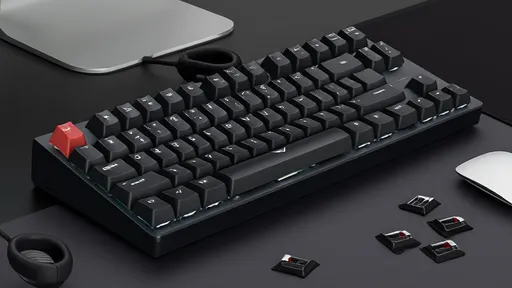
In the world of mechanical keyboards, the choice of switch type is far more than a matter of preference for sound or tactile feedback; it is a critical decision that can significantly impact a user's comfort and physical well-being during extended typing sessions. For professionals, writers, programmers, and anyone who spends hours at a keyboard, the cumulative effect of each keystroke can lead to hand fatigue, strain, or even more serious repetitive stress injuries. The hardware selection, therefore, moves from a simple component choice to an ergonomic consideration paramount to long-term health and productivity.
The fundamental mechanism of a mechanical keyboard switch involves a spring and a stem that actuates a signal when pressed. This design, while offering durability and a distinct feel, also means that every keypress requires a certain amount of force. It is this force, measured in grams (g) of actuation force and bottom-out force, that directly interacts with the muscles and tendons in your fingers and hands. Over thousands of keystrokes a day, even a few grams of difference per press can translate into a substantial variation in the total effort expended by your hands.
Among the most popular switch categories are linear, tactile, and clicky switches, each with a unique profile that influences typing fatigue. Linear switches, such as Cherry MX Reds or Blacks, offer a smooth keystroke from top to bottom with no tactile bump or audible click. They are often favored by gamers for their consistency and speed, but they also present a particular ergonomic profile for typists. The lack of a tactile bump means the typist must either bottom out the key—pressing it all the way down to the housing on every stroke—or develop a delicate touch to stop at the actuation point. Consistent bottoming out can send a sharp impact shock through the fingertip with every keypress, which, over time, may contribute to finger joint fatigue. However, their lighter actuation forces (typically around 45g for Reds) can mean less overall finger exertion compared to heavier switches, making them a potential choice for those with lighter touch typing styles.
Tactile switches, like Cherry MX Browns or Clears, provide a noticeable bump in the middle of the keystroke that signals the actuation point without the loud click of the clicky variety. This tactile feedback is their greatest ergonomic advantage. It allows the typist to confidently know when the key has been registered without needing to press it all the way down. This can significantly reduce the force of bottoming out, minimizing impact on the fingers and allowing for a lighter, more efficient typing style. The reduction in travel distance and impact can lead to less overall finger fatigue during long writing or coding marathons. The trade-off often comes in the form of a slightly higher actuation force (e.g., 55g for Browns, 65g for Clears), which requires a bit more initial effort per keystroke. For some, this can lead to quicker fatigue in the finger muscles themselves, making the choice highly individual.
Clicky switches, exemplified by Cherry MX Blues or Greens, combine the tactile bump with an audible click sound. The acoustic feedback provides the same confirmation as the tactile bump, theoretically allowing the user to avoid bottoming out. However, the mechanism that creates the click often involves a more complex internal action that can sometimes feel gritty or require a less smooth press. Furthermore, these switches frequently have some of the highest actuation forces (50g for Blues, 80g for Greens), demanding more strength from the fingers with every press. For a user typing thousands of words a day, this increased force requirement can accelerate muscle fatigue in the fingers and hands, making them a less ideal choice for those prone to strain, despite the satisfying auditory confirmation.
Beyond the classic Cherry MX spectrum, other switch manufacturers have introduced designs specifically aimed at reducing typing fatigue. Low-profile switches, from companies like Kailh or Cherry themselves, shorten the total travel distance of the key. A shorter travel means your fingers have less distance to cover with each keystroke, reducing the range of motion and potentially the effort required over time. Some users find this leads to less hand stretching and fatigue. Similarly, optical switches, which use light to actuate rather than a physical metal contact, can offer an incredibly smooth and frictionless keystroke. This smoothness reduces the subtle resistance felt during a press, which can make typing feel lighter and less taxing on the fingers, even if the actuation force is similar to a traditional mechanical switch.
Perhaps the most significant innovation in recent years is the rise of silent switches. Brands like Cherry (MX Silent Red/Black), ZealPC (Healios), and Gateron (Silent Inks) have integrated soft silicone dampeners into the stem design. These dampeners are placed at the top and bottom of the keystroke travel, cushioning both the downstroke and the return of the key. This effectively eliminates the hard plastic-on-plastic impact of bottoming out and the shock that comes with it. For a user concerned with hand fatigue, this can be a game-changer. The harsh physical feedback from thousands of daily keystrokes is absorbed, drastically reducing the vibration and impact transferred to the fingertips. This makes silent linear or tactile switches one of the most ergonomic choices available for marathon typing sessions, prioritizing long-term comfort above all else.
Selecting the right switch is an intensely personal journey, as hand size, typing style, and individual physiology all play a role. A switch that feels light and effortless to one person might feel mushy and unresponsive to another. A heavy switch that causes fatigue in a user with weaker hands might provide perfect stability and control for someone else. The only true way to determine the best switch for minimizing your hand fatigue is through firsthand testing. Keyboard switch testers, which are small boards with an assortment of individual switches, are an invaluable tool for this purpose. Spending time pressing different switches and paying attention to the feeling in your fingers and hand after repeated presses can provide more insight than any article ever could.
Ultimately, the goal of choosing a mechanical keyboard switch for long typing sessions is to find a balance that minimizes both impact and muscular exertion. It involves considering the force required to press the key, the feedback that helps you avoid bottoming out, and the physical design that cushions the keystroke. While tactile and silent switches often present strong ergonomic advantages, the final decision must be guided by the user's own hands. Investing time in selecting the right hardware is an investment in your comfort, health, and sustained productivity, ensuring that your primary tool for creation and communication supports you rather than holds you back.

By /Aug 26, 2025
By /Aug 26, 2025
By /Aug 26, 2025

By /Aug 26, 2025

By /Aug 26, 2025

By /Aug 26, 2025

By /Aug 26, 2025

By /Aug 26, 2025
By /Aug 26, 2025

By /Aug 26, 2025
By /Aug 26, 2025

By /Aug 26, 2025

By /Aug 26, 2025

By /Aug 26, 2025

By /Aug 26, 2025

By /Aug 26, 2025

By /Aug 26, 2025

By /Aug 26, 2025

By /Aug 26, 2025

By /Aug 26, 2025